
PDF generation API
Design the template once. Send the data every time.
Design a document template in the browser, publish it, and POST your data to get a print-ready PDF back. Real pagination, Japanese typesetting, a derived data contract, and byte-identical output.
Free plan: the whole editor, no card.
- Invoices
- Product labels
- Statutory forms
- Letterhead
- Recurring billing
How it works
Three steps from a blank page to an endpoint
- 01
Design in the browser
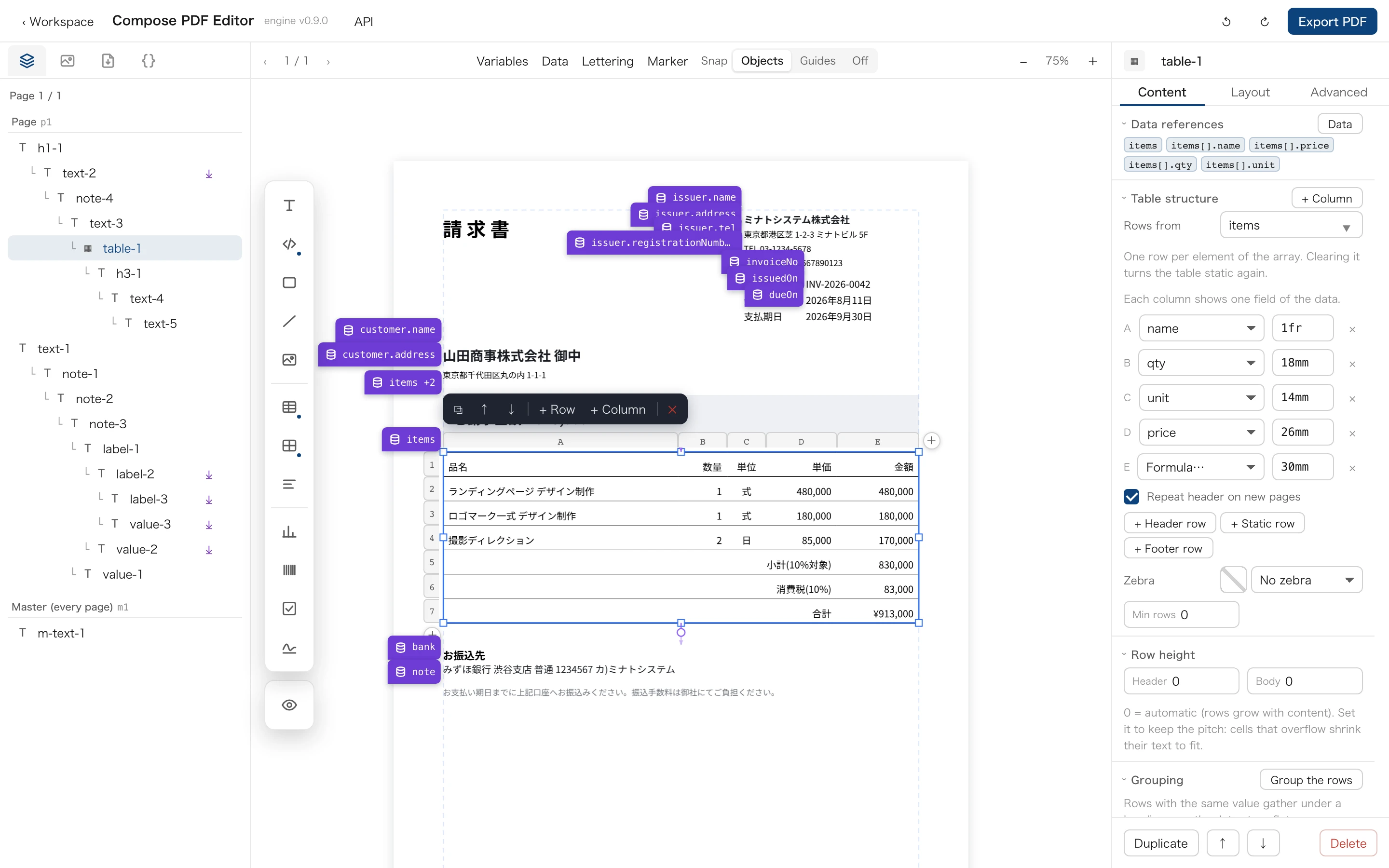
Draw the template on the page: text, tables, images, barcodes, charts. Turn any text into a field with one press — no HTML, no coordinates to write by hand.
- 02
Publish and get the contract
Publishing freezes a version and derives the data shape the template reads, as JSON Schema, TypeScript or Zod. Issue an API key under Settings → API keys.
- 03
POST the data, get the PDF
One request per document, or an array of records for a single collated file. A payload that does not match the contract gets a 400 naming the path, never a silently wrong page.
Try it
The real editor, no account
This is the product itself, not a recording. It lays out an invoice on its own; click anywhere and it is yours to edit.
Features
What a page has to get right
Real pagination
Tables break at a row, carry their header onto the next page, and the block that belongs with them travels too.
Binding is declaring
Turn a line of text into a field with one press. The same press writes it into the contract your callers read.
Variable data
One cell design repeated across an array. Twelve products in the data, twelve labels on the sheet.
A derived contract
The payload shape comes out of the template itself, as JSON Schema, TypeScript or Zod.
Japanese typesetting
Kinsoku line-breaking, shaping through HarfBuzz, per-cluster font fallback, and subset CID fonts embedded in the file. CJK is the default case here, not a patch.
Deterministic output
The same template, data, fonts and engine version produce byte-identical PDFs. No clock, no randomness, no iteration order left to chance — so a diff means a change.
Print-ready, not just printable
Spot colours as Separation, bleed boxes, AES-256 encryption with per-document permissions, and metadata declared on the template.
Your stationery underneath
Attach a base PDF and the template renders on top of it. Pre-printed letterhead and statutory forms stay exactly as they are.
One call, many documents
Send an array of records and get one file, laid out one record at a time. Bookmarks, links, encryption and the base PDF all survive the merge.
API
One call, one PDF — and the template tells you what to send
curl -X POST https://composepdf.com/v1/canvases/{canvasId}/pdf \
  -H "x-api-key: $COMPOSEPDF_API_KEY" \
  -H "content-type: application/json" \
  -d '{
    "data": {
      "customer": { "name": "Acme Inc." },
      "items": [
        { "name": "Design work", "price": 1200 },
        { "name": "Hosting",     "price": 90 }
      ]
    }
  }' \
--output invoice.pdf// Derived from the template, not hand-written.
// Exportable as JSON Schema, TypeScript or Zod.
export interface MonthlyInvoiceData {
customer: {
name: string;
address?: string;
};
period: {
ym: string;
due: string;
};
items: {
description: string;
qty: number;
amount: number;
}[];
}Because the expression language is deliberately not Turing-complete — no assignment, no loops, no user-defined functions — every reference a template makes can be resolved statically. That is what makes the contract derivable instead of documented.
- Generated, not maintained. Change a field on the canvas and the schema changes with it.
- Enforced at the edge. The payload is checked before layout runs, and the error names the path — items[3].amount, not “invalid request”.
- Safe to run. A template is data, and the language it embeds cannot loop or call out. Third-party templates execute under the same rules as your own.
Measured
Have a model write the template, not the document
A model that draws the page itself has to emit the whole document on every render — the frames, the colours, the table, the rules. Against a published template it emits the record and nothing else, so the layout becomes a cost you pay once. It is the same over MCP: render_document takes the payload the contract describes, never the geometry.
Counted with the o200k_base tokenizer over the demo invoice every new account is seeded with — template and payload, both minified, output tokens only. The instructions you send a model, and the re-runs when the page comes back crooked, are counted on neither side. The ratio depends on the document: a form whose data outweighs its layout narrows it. What does not change is which side you pay for twice.
Fast enough to be boring
It is Rust, and it does not start a browser to draw a page. The hundredth invoice costs less than the first because the fonts are embedded once. Measured on an Apple M1 Pro, median of 100 runs, layout and PDF writing only — the network round trip is yours.
Works with
Where the documents come from, and where they go
Claude, Cursor, Codex — any MCP client
Connect the MCP endpoint with an API key or OAuth. Asking what a template takes returns its contract; asking for the document returns the PDF.Connect an MCP client
Google Sheets and Notion
Connect a Google Sheet or a Notion database and pull the rows at render time, without storing a copy. Or push rows in with a write-only API key.Connect a data source
Embedded live preview
Put the template in your own product as an iframe and stream your form state to it — the page re-lays out as the user types.Embed a preview
Free tools
A PDF conformance checker, a code-to-PDF converter and ASCII-art makers, all built on the same engine. They run in your browser; nothing is uploaded.Open the tools
FAQ
Questions people ask before they sign up
Do I have to write HTML or code to make a template?
No. You draw the template in the browser editor — text, tables, images, barcodes, charts — and turn any text into a field with one press. Code enters only when you call the API.
What does the free plan include?
The whole editor: designing and exporting PDFs in your browser, unmetered. Rendering through the API and MCP starts on the Solo plan, where it is unlimited.
Can it typeset Japanese?
Yes. Kinsoku line-breaking, shaping through HarfBuzz, per-cluster font fallback and subset CID fonts embedded in the file. CJK is the default case here, not a patch.
Can I get PDF/X-4 or PDF/A-3b?
On export from the editor, with your own ICC profile: Standard, PDF/X-4 or PDF/A-3b, with Factur-X metadata when you need it. Documents rendered through the API are standard PDF.
Is the output deterministic?
Yes. The same template, data, fonts and engine version produce byte-identical PDFs. No clock, no randomness, no iteration order left to chance — so a diff means a change.
Can an AI agent use it?
Yes, over MCP. Claude Desktop, Claude Code, Cursor, Codex and any other MCP client can connect with an API key or OAuth, read what a template takes, and render the document.
What happens to the data I send?
Rows read from a connected spreadsheet or database are never copied. Rendered documents are kept only if you ask us to store them, and temporary rendering artefacts are deleted after seven days.
Get started
Start on the free plan
The whole editor, unmetered — designing and exporting run in your browser, on every plan. Rendering through the API starts on Solo, where it is unlimited. No card, and see pricing for the rest.
Create an account